

Runbooks
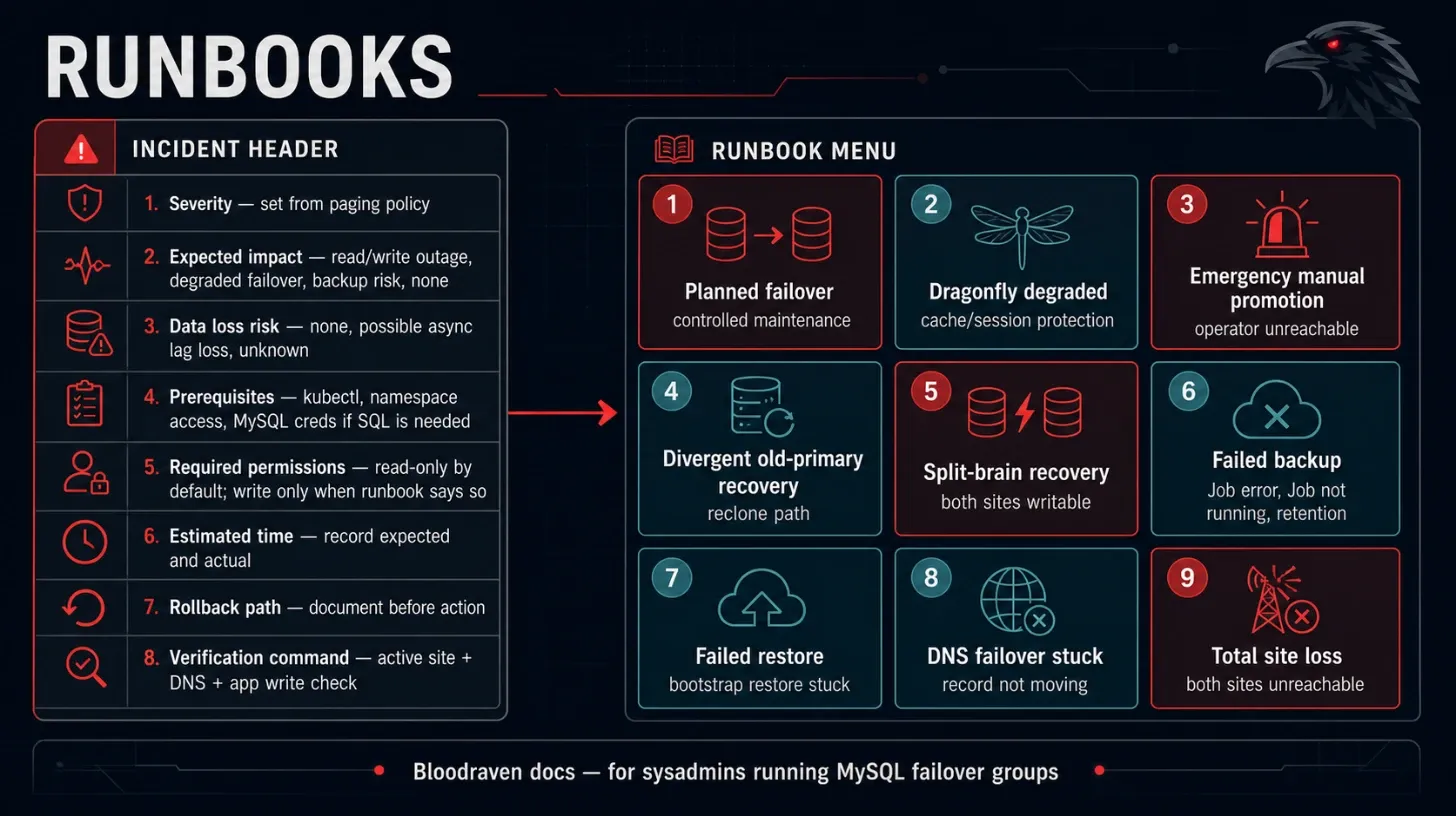
Every runbook starts with the same incident header. Fill it in before making changes.
| Field | Value |
|---|---|
| Severity | Set from paging policy |
| Expected impact | Read/write outage, degraded failover, backup risk, or no user impact |
| Data loss risk | None, possible async lag loss, or unknown |
| Prerequisites | kubectl, namespace access, MySQL credentials if SQL is needed |
| Required permissions | Read CRs/Events/logs; write CR annotations only when runbook says so |
| Estimated time | Record expected and actual time |
| Rollback path | Document before action |
| Verification command | Always include active site, DNS, and app write check when relevant |
If spec.dragonfly.enabled=true, include status.dragonfly.phase, active Dragonfly Service endpoints, and a Redis-compatible cache/session read/write check in the same incident record.
Planned failover
Use Planned Failover for controlled maintenance. Do not use during split-brain or when the target replica is unhealthy.
kubectl annotate mysqlfailovergroup orders -n orders \
  bloodraven.shipstream.io/planned-failover=pdx --overwrite
kubectl get mysqlfailovergroup orders -n orders -o wide
Verify DNS and application writes before starting maintenance on the old active site.
If Dragonfly is enabled, also verify status.plannedFailover.dragonfly.sessionsPreserved and confirm the active Dragonfly Service points at the new site.
kubectl get mysqlfailovergroup orders -n orders \
  -o jsonpath='{.status.plannedFailover.dragonfly}{"\n"}'
kubectl get endpoints orders-dragonfly -n orders
Dragonfly degraded
Use when status.dragonfly.phase=Degraded, bloodraven_dragonfly_site_up==0, Dragonfly promotion failed, status.dragonfly.replTakeoverSupported=false, or you see DragonflySessionsLost / DragonflyReplTakeoverUnsupported. MySQL is still authoritative; this runbook protects cache/session continuity.
- Confirm MySQL
status.activeSiteand application writes are healthy. - Inspect
status.dragonfly.replTakeoverSupportedandreplTakeoverProbeMessage. A false value means the running image does not advertiseREPLTAKEOVER— pinv1.38.0+(or a private build that has the command) and roll the StatefulSets. - Inspect
status.dragonfly.sites[]for unreachable, stale-master, syncing, or link-down sites. - Check the active Dragonfly Service endpoints and pod role/traffic labels.
- Restart or reschedule only the affected Dragonfly pod if the stale site has not accepted writes.
- If a stale master may have accepted writes, keep it out of the active Service and decide whether cache/session data can be discarded.
kubectl get mysqlfailovergroup orders -n orders \
  -o jsonpath='{.status.dragonfly}{"\n"}'
kubectl get pod -n orders -l app.kubernetes.io/name=dragonfly --show-labels
kubectl get endpoints orders-dragonfly -n orders
Emergency manual promotion
Use only when automation cannot complete and you have confirmed the old primary cannot accept writes.
- Preserve Events and logs.
- Confirm old primary is unreachable or fenced.
- Confirm candidate has the best GTID/replication position available.
- Promote using your approved MySQL operational procedure.
- Update or unblock Bloodraven reconciliation only after state is consistent.
Verification:
kubectl get mysqlfailovergroup orders -n orders -o yaml
dig orders.az.example.com
Split-brain recovery
Use when more than one site can accept writes.
- Stop application writes if possible.
- Identify all writable sites.
- Choose the authoritative site using business ownership and GTID evidence.
- Fence losing sites by ensuring
super_read_only=ONand blocking application traffic. - Preserve divergent data for manual reconciliation.
- Reclone losing sites only after data owners approve.
Do not skip GTIDs to make replication look green.
Divergent old primary recovery
Use when the old primary contains transactions absent from the promoted site.
- Export evidence from the old primary.
- Ask the data owner whether divergent rows must be recovered manually.
- Keep the old primary fenced.
- Reclone from the active primary when approved.
- Verify replication returns to healthy.
kubectl describe mysqlfailovergroup orders -n orders
kubectl get events -n orders --sort-by=.lastTimestamp | grep -i divergent
PVC loss recovery
Use when a MySQL data PVC is deleted or corrupted.
- Confirm whether the affected site is active.
- If active, stop application writes and follow emergency recovery policy.
- If standby, reclone from the active primary.
- If both sites are lost, restore from backup.
See Backup And Restore for restore workflows.
Total site loss
Use when all nodes/storage/network for a site are gone.
- Confirm surviving site is writable and healthy.
- Confirm DNS points to the surviving site.
- Disable app scheduling to the lost site.
- Rebuild site infrastructure.
- Rejoin via clone or restore.
Expected impact is bounded by failover detection, relay-log drain, DNS TTL, and application reconnect behavior.
Keyring not sealed
Use when bloodraven_keyring_phase{phase="sealed"} is 0 for a site, or
status.conditions[type=EncryptionAtRestReady] is False.
A site that is not sealed is running with a writable keyring. Its data is still encrypted, but the operator cannot yet prove the key is durably escrowed.
- Find out what it is waiting for —
messagecarries the reason:kubectl get mysqlfailovergroup orders -n orders \ -o jsonpath='{range .status.encryptionAtRest.sites[*]}{.name}{"\t"}{.phase}{"\t"}{.message}{"\n"}{end}' UnsealedwithunsealReason: CloneorBootstrapis normal and transient. Wait for the clone to finish.Unsealedwith "waiting for the sidecar to escrow" — check the sidecar can reach the operator:kubectl exec -n orders deploy/mysql-orders-iad -c sidecar -- \ wget -qO- localhost:8080/keyring/statuslastErroron that payload names the failure. Common causes: the operator's auxiliary Service is unreachable, or the escrow token Secret was deleted (the operator re-mints it on the next reconcile, but the pod needs to roll to pick it up).Escrowedthat never becomesSealed— the pod has not rolled onto the sealed rendering. Check for a stuck ordered update (status.updatePhase).Failed— read the message and follow Keyring escrow lost if it names a missing or corrupt Secret.
Full background: Data-at-rest encryption.
Keyring escrow lost
Use on a KeyringEscrowMissing or KeyringEscrowCorrupt Event.
- Confirm the pod is still running:
kubectl get pod -n orders -l shipstream.io/site=iad - If it is running, recreate the exact missing Secret from the keyring
still mounted in the running pod. Do not force an unseal or rollout:
that would destroy the only surviving in-memory copy before it was
durable again.
set -o pipefail
POD=$(kubectl get pod -n orders \
  -l shipstream.io/failover-group=orders,shipstream.io/site=iad \
  -o jsonpath='{.items[0].metadata.name}')
SECRET=$(kubectl get mysqlfailovergroup orders -n orders \
  -o jsonpath='{.status.encryptionAtRest.sites[?(@.name=="iad")].keyringSecret}')
VERSION=$(kubectl get mysqlfailovergroup orders -n orders \
  -o jsonpath='{.status.encryptionAtRest.sites[?(@.name=="iad")].keyringVersion}')
DIGEST=$(kubectl get mysqlfailovergroup orders -n orders \
  -o jsonpath='{.status.encryptionAtRest.sites[?(@.name=="iad")].keyringDigest}')
KEYRING_DIR=$(kubectl get mysqlfailovergroup orders -n orders \
  -o jsonpath='{.spec.encryptionAtRest.keyring.dataFileDir}')
KEYRING_DIR=${KEYRING_DIR:-/run/mysql-keyring}
FG_UID=$(kubectl get mysqlfailovergroup orders -n orders -o jsonpath='{.metadata.uid}')

kubectl exec -n orders "$POD" -c mysql -- cat "$KEYRING_DIR/keyring" | \
  kubectl create secret generic "$SECRET" -n orders --from-file=keyring=/dev/stdin
ACTUAL_DIGEST=$(kubectl get secret "$SECRET" -n orders -o jsonpath='{.data.keyring}' | \
  base64 -d | sha256sum | cut -d' ' -f1)
if [[ "sha256:${ACTUAL_DIGEST}" != "$DIGEST" ]]; then
  kubectl delete secret "$SECRET" -n orders
  echo "restored keyring digest does not match status; refusing to continue" >&2
  exit 1
fi
kubectl label secret "$SECRET" -n orders \
  app.kubernetes.io/name=mysql-keyring \
  app.kubernetes.io/managed-by=bloodraven \
  shipstream.io/failover-group=orders shipstream.io/site=iad \
  shipstream.io/keyring-version="$VERSION"
kubectl annotate secret "$SECRET" -n orders shipstream.io/keyring-digest="$DIGEST"
kubectl patch secret "$SECRET" -n orders --type=merge -p="{
  \"metadata\":{\"ownerReferences\":[{
    \"apiVersion\":\"shipstream.io/v1alpha1\",\"kind\":\"MysqlFailoverGroup\",
    \"name\":\"orders\",\"uid\":\"${FG_UID}\",\"controller\":true,\"blockOwnerDeletion\":true
  }]},\"immutable\":true
}"

SITE_INDEX=$(kubectl get mysqlfailovergroup orders -n orders -o json | \
  jq -er '.status.encryptionAtRest.sites | map(.name) | index("iad")')
kubectl patch mysqlfailovergroup orders -n orders --subresource=status \
  --type=json -p="[
    {\"op\":\"test\",\"path\":\"/status/encryptionAtRest/sites/${SITE_INDEX}/name\",\"value\":\"iad\"},
    {\"op\":\"replace\",\"path\":\"/status/encryptionAtRest/sites/${SITE_INDEX}/phase\",\"value\":\"Sealed\"}
  ]"
Verify that the site returns toSealedwithout restarting the pod. - If the pod is already gone, that site's data is unrecoverable.
Delete the unreadable PVC, then re-clone it from a healthy peer. The
confirmation token is mandatory because this permanently discards the
target site's local data:
kubectl delete pvc mysql-orders-iad-data -n orders kubectl annotate mysqlfailovergroup orders -n orders \ bloodraven.shipstream.io/reclone-site='iad:confirm=orders' - If every site lost its escrow, restore from backup. Backup artifacts are logical dumps protected by a separate key, so they do not depend on any site's keyring.
Network partition diagnosis
Use Network Partitions. Prioritize preventing two writable sites.
kubectl get mysqlfailovergroup orders -n orders -o yaml
kubectl get endpoints,networkpolicy -n orders
kubectl get events -n orders --sort-by=.lastTimestamp
Failed backup
- Keep the last successful backup.
- Inspect
MysqlBackupstatus and Job logs. - Fix credentials, storage, or MySQL source health.
- Trigger a manual backup.
- Verify the new backup.
kubectl get mysqlbackup -n orders
kubectl describe mysqlbackup -n orders <backup-name>
Failed restore
- Confirm this is a recovery environment or approved destructive action.
- Inspect restore Job logs.
- Validate source path and decryption Secret.
- Recreate the recovery failover group if bootstrap partially initialized MySQL.
Operator unavailable
Use Operator Availability. Sidecar self-fencing is part of the safety model; do not disable it during diagnosis.
kubectl rollout status deployment/bloodraven -n bloodraven
kubectl logs -n bloodraven deploy/bloodraven
kubectl get lease -A | grep bloodraven
DNS failover stuck
- Confirm
status.activeSitechanged. - Inspect
DNSEndpointand external-dns logs. - Confirm provider record and TTL.
- If applications still write old site, fence the old site and restart affected clients.
kubectl get dnsendpoint -A | grep orders
kubectl logs -n external-dns deploy/external-dns
dig orders.az.example.com
kubectl bloodraven plugin
kubectl-bloodraven is the operator's day-2 sidekick: a single static binary that wraps the annotation grammars and on-demand CR shapes the operator already understands. It is the recommended way to drive a planned failover, kick off an ad-hoc backup or verification, or peek at the current health of a MysqlFailoverGroup without reaching for raw kubectl annotate / kubectl apply incantations.
Troubleshooting