

Credentials And TLS
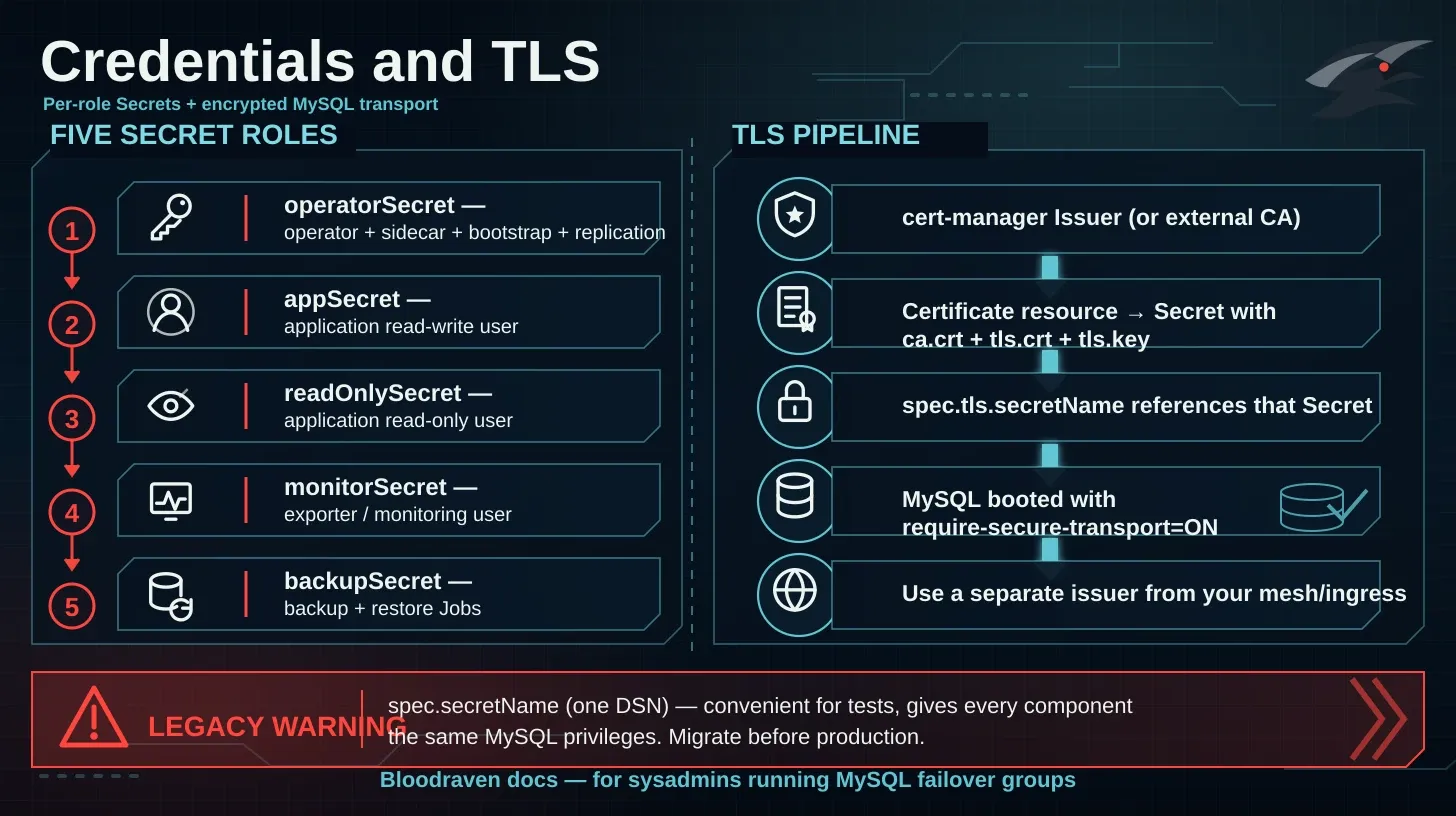
Bloodraven supports two credential models. Use per-role credentials for new deployments.
spec.secretName points at a single Secret containing a dsn key. It is convenient for tests but gives every component the same MySQL privileges. Do not use it for new production failover groups. Migrate by creating the role Secrets below, setting spec.credentials, and removing spec.secretName in the same apply.Credential roles
| Field | Required keys | Purpose |
|---|---|---|
operatorSecret | username, password, MYSQL_ROOT_PASSWORD; optional MYSQL_REPLICATION_USER, MYSQL_REPLICATION_PASSWORD | Operator, sidecar, bootstrap, replication |
appSecret | username, password | Application read-write user |
readOnlySecret | username, password | Application read-only user |
monitorSecret | username, password | Exporter and monitoring user |
backupSecret | username, password | Backup and restore Jobs |
Create Secrets
kubectl create namespace orders

kubectl create secret generic orders-mysql-operator -n orders \
  --from-literal=username=bloodraven \
  --from-literal=password='replace-with-random-operator-password' \
  --from-literal=MYSQL_ROOT_PASSWORD='replace-with-random-root-password' \
  --from-literal=MYSQL_REPLICATION_USER=replicator \
  --from-literal=MYSQL_REPLICATION_PASSWORD='replace-with-random-replication-password'

kubectl create secret generic orders-mysql-app -n orders \
  --from-literal=username=orders_app \
  --from-literal=password='replace-with-random-app-password'

kubectl create secret generic orders-mysql-readonly -n orders \
  --from-literal=username=orders_readonly \
  --from-literal=password='replace-with-random-readonly-password'

kubectl create secret generic orders-mysql-monitor -n orders \
  --from-literal=username=orders_monitor \
  --from-literal=password='replace-with-random-monitor-password'

kubectl create secret generic orders-mysql-backup -n orders \
  --from-literal=username=orders_backup \
  --from-literal=password='replace-with-random-backup-password'
cert-manager TLS Secret
spec.tls.secretName must reference a Secret with ca.crt, tls.crt, and tls.key. With cert-manager, create a Certificate in the same namespace as the failover group:
apiVersion: cert-manager.io/v1
kind: Certificate
metadata:
  name: orders-mysql-tls
  namespace: orders
spec:
  secretName: orders-mysql-tls
  duration: 2160h
  renewBefore: 360h
  issuerRef:
    name: mysql-ca
    kind: ClusterIssuer
  commonName: orders.az.example.com
  dnsNames:
    - orders.az.example.com
    - mysql-orders-primary.orders.svc.cluster.local
    - mysql-orders-replicas.orders.svc.cluster.local
    - mysql-orders-iad.orders.svc.cluster.local
    - mysql-orders-pdx.orders.svc.cluster.local
Adopting spec.tls, changing spec.tls.secretName, or rotating the TLS Secret bytes restarts the topology manager so the operator's own MySQL checkers pick up the new material. MySQL pods roll independently via the spec-hash drift path.
The operator uses verified TLS for credentials-mode MySQL connections when spec.tls.secretName is set. Include ca.crt in the Secret and make sure the certificate covers the primary Service plus every per-site Service (mysql-<group>-<site>.<namespace>.svc.cluster.local) so failover probes, promotion, bootstrap/reclone, and credential reconciliation can validate the server identity.
The per-site Service SAN is required for a second reason: spec.tls also makes the operator set require_secure_transport=ON, so each sidecar's MySQL connection is TLS as well. The sidecar connects over loopback, which appears in no certificate, so it verifies the server against its own site's Service name. Without that SAN the sidecar cannot query MySQL at all — /health returns 503 and the liveness probe restarts the container, which also stops the self-fencing monitor and the super_read_only safety net.
Backup and restore Jobs get the same Secret mounted at /etc/mysql/tls and connect with ssl-mode=VERIFY_CA against its ca.crt — both the mysqlsh session and the mysqlbinlog | mysql PITR replay. A TLS-enabled Job fails before connecting if the CA path is empty, missing, unreadable, or does not contain usable CA certificates; it never downgrades to unverified TLS.
Verification Jobs are different. They load the backup into an ephemeral mysqld that listens on loopback without a certificate, so that local connection stays plaintext and does not use the group's TLS material.
spec.secretName mode you supply the MySQL DSN yourself. When you enable spec.tls, add a tls= parameter to that DSN (for example ?tls=true) — the operator's own site connections use it verbatim. The sidecar is the exception: it is given verified TLS automatically unless your DSN already sets tls=, in which case your choice wins.Manual TLS Secret
kubectl create secret generic orders-mysql-tls -n orders \
  --from-file=ca.crt=./ca.crt \
  --from-file=tls.crt=./tls.crt \
  --from-file=tls.key=./tls.key
Failover group example
apiVersion: shipstream.io/v1alpha1
kind: MysqlFailoverGroup
metadata:
  name: orders
  namespace: orders
spec:
  image: mysql:9.7
  sidecarImage: ghcr.io/shipstream/bloodraven-sidecar:1.3.2
  credentials:
    operatorSecret: orders-mysql-operator
    appSecret: orders-mysql-app
    readOnlySecret: orders-mysql-readonly
    monitorSecret: orders-mysql-monitor
    backupSecret: orders-mysql-backup
  tls:
    issuerRef:
      name: mysql-ca
      kind: ClusterIssuer
    secretName: orders-mysql-tls
  dns:
    hostname: orders.az.example.com
    ttl: 60
  sites:
    - name: iad
      zone: us-east-1a
      taintNodeSelector:
        shipstream.io/failover-group.orders: "true"
        shipstream.io/site.orders: iad
      lbIP: 10.0.1.1
      storage:
        storageClassName: fast-ssd
        size: 100Gi
    - name: pdx
      zone: us-west-2a
      taintNodeSelector:
        shipstream.io/failover-group.orders: "true"
        shipstream.io/site.orders: pdx
      lbIP: 10.0.2.1
      storage:
        storageClassName: fast-ssd
        size: 100Gi
Client connection examples
mysql --host=orders.az.example.com \
  --user=orders_app \
  --password \
  --ssl-mode=VERIFY_IDENTITY \
  --ssl-ca=/etc/mysql/ca.crt
JDBC:
jdbc:mysql://orders.az.example.com:3306/orders?sslMode=VERIFY_IDENTITY&serverSslCert=/etc/mysql/ca.crt
Go go-sql-driver/mysql should register a TLS config with the CA and use tls=<name> in the DSN. See App Integration for application reconnect guidance.
Rotation expectations
- Updating a referenced Secret is the supported rotation path.
- Rotate one role at a time and watch operator Events.
- Keep old app credentials valid until application pods have restarted or connection pools have reconnected.
- Treat the TLS private key and backup encryption passphrases as recovery material.