

App Integration
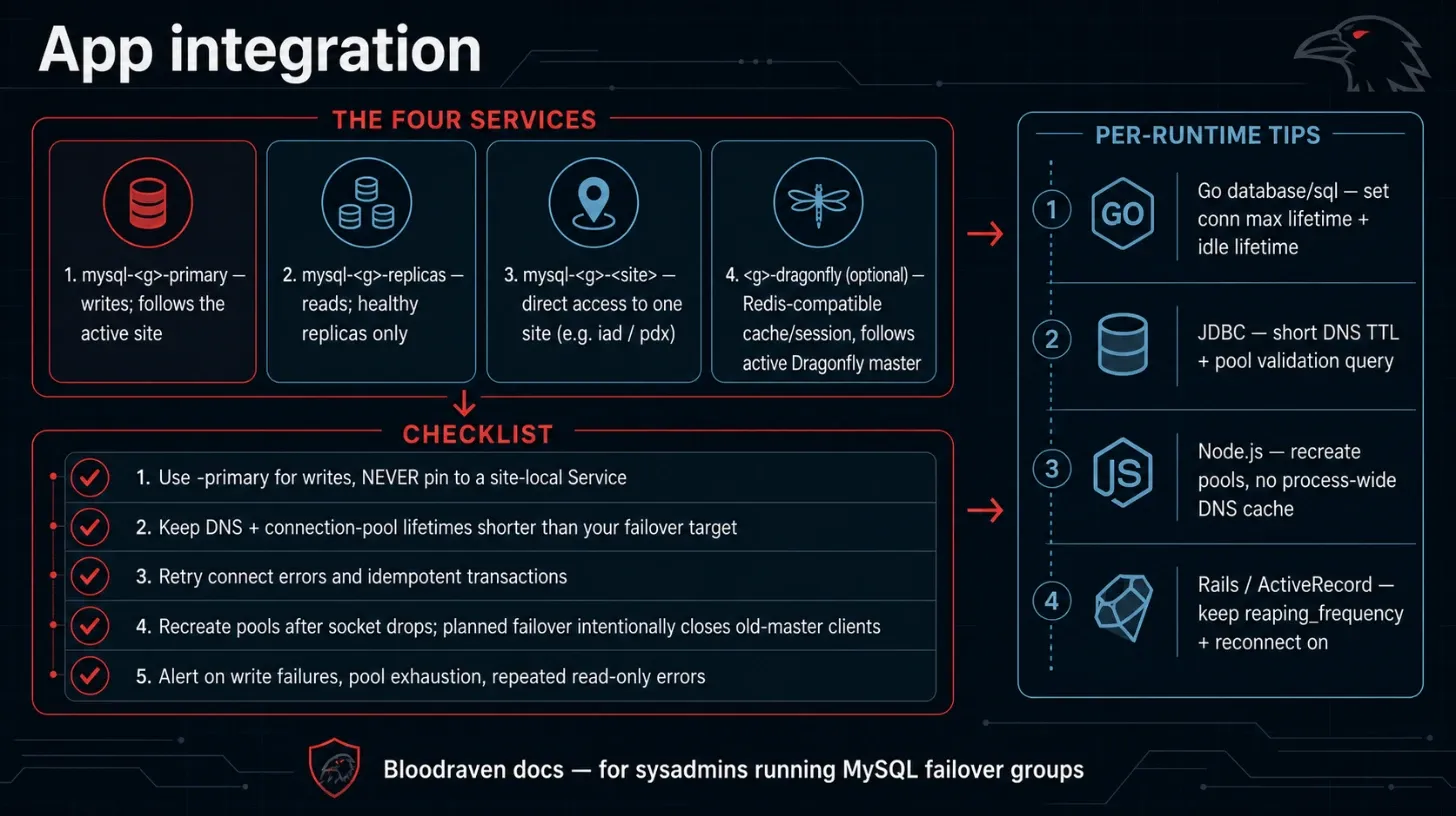
This page explains how applications connect to a MySQL failover group, optional Dragonfly cache/session endpoint, and handle failover events.
Application checklist
- Use
mysql-<group>-primaryor the external active-site DNS name for writes. - If
spec.dragonfly.enabled=true, use<group>-dragonflyfor Redis-compatible cache/session traffic. - Keep DNS and connection-pool lifetimes short enough for your failover target.
- Retry connection establishment and failed transactions that are safe to retry.
- Configure Redis/Dragonfly clients to reconnect after socket drops; planned failover may intentionally close old-master client connections.
- Do not pin writes to a site-local Service unless you are implementing warm-standby logic deliberately.
- Alert on application write failures, connection pool exhaustion, and repeated read-only errors.
DNS and pool guidance by runtime
| Runtime | Guidance |
|---|---|
Go database/sql | Set connection max lifetime and idle lifetime; reopen failed connections after failover. |
| Java/JDBC | Check JVM DNS cache TTL and pool validation query settings. |
| Node.js | Recreate pools after connection loss; avoid process-wide DNS caches with long TTLs. |
| Rails/ActiveRecord | Keep reaping_frequency and reconnect behavior enabled; restart workers if pools pin old sockets. |
Connection examples
Go DSN shape:
orders_app:password@tcp(mysql-orders-primary.orders.svc.cluster.local:3306)/orders?parseTime=true&timeout=5s&readTimeout=10s&writeTimeout=10s
JDBC:
jdbc:mysql://mysql-orders-primary.orders.svc.cluster.local:3306/orders?connectTimeout=5000&socketTimeout=10000
Node.js mysql2:
import mysql from 'mysql2/promise';

const pool = mysql.createPool({
  host: 'mysql-orders-primary.orders.svc.cluster.local',
  user: process.env.MYSQL_USER,
  password: process.env.MYSQL_PASSWORD,
  database: 'orders',
  waitForConnections: true,
  connectionLimit: 10,
  connectTimeout: 5000,
});
Rails:
production:
  adapter: mysql2
  host: mysql-orders-primary.orders.svc.cluster.local
  username: <%= ENV.fetch("MYSQL_USER") %>
  password: <%= ENV.fetch("MYSQL_PASSWORD") %>
  database: orders
  reconnect: true
Connection endpoints
For a MysqlFailoverGroup named orders in namespace default, the operator creates these Services:
| Service | DNS name | Purpose |
|---|---|---|
mysql-orders-primary | mysql-orders-primary.default.svc.cluster.local:3306 | Writes. Always points to the active primary. |
mysql-orders-replicas | mysql-orders-replicas.default.svc.cluster.local:3306 | Reads. Points to healthy read replicas. |
mysql-orders-iad | mysql-orders-iad.default.svc.cluster.local:3306 | Client-facing access to the iad site instance. |
mysql-orders-pdx | mysql-orders-pdx.default.svc.cluster.local:3306 | Client-facing access to the pdx site instance. |
mysql-orders-reader | mysql-orders-reader.default.svc.cluster.local:3306 | Health-gated site-specific read pool for a read-only site. |
mysql-orders-<site>-internal | mysql-orders-<site>-internal.default.svc.cluster.local | Operator-only administrative route for MySQL 3306 and the sidecar. Do not use from applications. |
Client-facing site Services expose only the named MySQL port. The sidecar is
not externally exposed and never receives a NodePort. Internal Services are
always ClusterIP, set publishNotReadyAddresses: true, and do not select on
the reader's healthy label. This preserves the operator's route for probes,
replication repair, clone, backup, and sidecar peer traffic even while the
reader pod is not ready or its application endpoint has been shed.
When spec.tls is enabled, operator Go clients dial the internal Service but
continue verifying the existing client-facing site hostname as TLS
ServerName; existing certificates do not need to add the -internal name.
Strict hostname verification configured inside MySQL-native replication or
clone is separate and must trust the internal Service hostname.
When spec.dragonfly.enabled=true, Bloodraven also owns the cache/session endpoints for the same failover group:
| Service | DNS name | Purpose |
|---|---|---|
orders-dragonfly | orders-dragonfly.default.svc.cluster.local:6379 | Application Redis-compatible endpoint. Always selects the active Dragonfly master. |
orders-dragonfly-iad | orders-dragonfly-iad.default.svc.cluster.local:6379 | Direct iad Dragonfly pod access for operator control and debugging. |
orders-dragonfly-pdx | orders-dragonfly-pdx.default.svc.cluster.local:6379 | Direct pdx Dragonfly pod access for operator control and debugging. |
Do not deploy separate tenant-chart Dragonfly CRs for a failover group where Bloodraven has spec.dragonfly.enabled=true. Bloodraven is the owner of the StatefulSets, Services, replication role labels, active Service selector, and planned/emergency promotion status. Tenant charts should either omit their Dragonfly templates or gate them behind a disabled-by-default value, then point application settings at the Bloodraven-created orders-dragonfly Service.
Recommended app-facing environment variables:
- name: REDIS_HOST
  value: orders-dragonfly.default.svc.cluster.local
- name: REDIS_PORT
  value: "6379"
- name: REDIS_PASSWORD
  valueFrom:
    secretKeyRef:
      name: tenant-dragonfly
      key: password
Redis/Dragonfly clients must reconnect after connection drops. During planned failover Bloodraven may remove the old master from the active Service and issue CLIENT KILL TYPE NORMAL so clients reconnect to the newly promoted site instead of holding stale sockets.
For planned Dragonfly image upgrades that can tolerate a short cache/session outage, configure native snapshot restore before using the snapshot-upgrade workflow:
spec:
  dragonfly:
    snapshot:
      dir: s3://tenant-dragonfly/orders/prod
      serviceAccountName: dragonfly-backup
      credentialsSecretName: dragonfly-s3
      s3Endpoint: rustfs.default.svc.cluster.local:9000
      s3UseHTTPS: false
Bloodraven passes snapshot.dir to Dragonfly as --dir, renders S3-compatible flags such as --s3_endpoint and --s3_use_https, projects snapshot.credentialsSecretName as AWS credential environment variables when set, and assigns snapshot.serviceAccountName to the Dragonfly pods so cloud IAM systems such as EKS IRSA can grant bucket access. Treat this as session-continuity insurance for planned maintenance, not as the durable backup for application state.
To run the planned snapshot-restore upgrade, annotate the failover group with the target image:
kubectl -n default annotate --overwrite mysqlfailovergroup orders \
  bloodraven.shipstream.io/dragonfly-snapshot-upgrade=docker.dragonflydb.io/dragonflydb/dragonfly:<target>
Track progress in status.dragonfly.upgrade. During SavingSnapshot, UpdatingActive, and WaitingForActiveRestore, Bloodraven intentionally removes the active Dragonfly endpoint so clients see a planned cache outage instead of writing to a half-restored pod.
Default connection pattern
For workloads that should move with the active database site:
# Writes
mysql-orders-primary.<namespace>.svc.cluster.local:3306

# Reads
mysql-orders-replicas.<namespace>.svc.cluster.local:3306
The -primary Service selector is updated by the operator whenever a failover occurs. Use this for workers, cron jobs, runners, and other write-dependent workloads that Bloodraven should evict and reschedule to the active site.
For warm-standby web pods that intentionally keep one deployment per site, use the site-local pattern instead.
Failover strategies
Bloodraven supports two strategies for handling application failover. Choose the one that fits your deployment model.
Strategy 1: Taint-based failover
Best for applications that run on dedicated or shared nodes and should be fully migrated when the database fails over.
How it works:
- The operator taints nodes at the old active site with
shipstream.io/db-readonly-<group>=true:NoExecute - Kubernetes evicts pods that do not tolerate this taint
- Those pods are rescheduled to the new active site's nodes (which have the taint removed)
Application requirements:
- Deploy on nodes selected by
spec.sites[].taintNodeSelector, such asshipstream.io/failover-group.orders=trueandshipstream.io/site.orders=iad - Do not add a toleration for
shipstream.io/db-readonly-<name>:NoExecute(your own group's taint) - On shared nodes, add tolerations for other groups' taints (see Placement Contract)
- Use
mysql-orders-primaryfor writes (the Service follows the active site)
Example pod spec:
apiVersion: v1
kind: Pod
metadata:
  name: order-processor
spec:
  affinity:
    nodeAffinity:
      requiredDuringSchedulingIgnoredDuringExecution:
        nodeSelectorTerms:
          - matchExpressions:
              - key: shipstream.io/failover-group
                operator: In
                values: ["orders"]
  containers:
    - name: app
      image: myapp:latest
      env:
        - name: MYSQL_HOST
          value: mysql-orders-primary.default.svc.cluster.local
        - name: MYSQL_PORT
          value: "3306"
  # No toleration for shipstream.io/db-readonly-orders -- pod will be evicted on failover
  # On shared nodes, add tolerations for OTHER groups' taints:
  # tolerations:
  #   - key: shipstream.io/db-readonly-inventory
  #     operator: Exists
  #     effect: NoExecute
Strategy 2: Service-based failover
Best for applications that are deployed independently per site and only need to follow the database.
How it works:
- Each site's application deployment connects to
mysql-orders-primaryfor writes - On failover, the
-primaryService selector shifts to the new active site - Applications at both sites see the endpoint change through normal Kubernetes Service discovery
Application requirements:
- Connect to
mysql-orders-primaryfor writes - Optionally connect to
mysql-orders-replicasfor reads - Handle brief connection errors during failover (seconds, not minutes)
Strategy 3: Site-local warm standby
Best for web/API pods that run in every site and should serve a maintenance page when their local MySQL is not writable. This avoids cross-site app-to-database traffic and lets each site's frontend reflect the state of the local database instance.
How it works:
- Each site deployment connects to its own site Service:
mysql-orders-iadiniad,mysql-orders-pdxinpdx. - The app checks
@@global.read_onlyor handles MySQL error 1290. - If local MySQL is read-only, the app serves maintenance / read-only mode instead of sending writes across the WAN.
- User-facing DNS or traffic steering moves users to the active site;
Bloodraven still updates the failover group's external DNS record for
clients that use
spec.dns.hostnamedirectly.
Application requirements:
- Run one deployment per site, pinned by node affinity or your GitOps generator.
- Set
MYSQL_HOSTto the site-local Service, notmysql-orders-primary. - Do not tolerate your own group's
db-readonlytaint for workers that must move; web pods that intentionally stay warm in both sites may tolerate it and rely on the local read-only check. - Keep database writes behind retry/maintenance handling. A local read-only response is expected during normal failover.
Example per-site deployment fragment:
apiVersion: apps/v1
kind: Deployment
metadata:
  name: orders-web-iad
spec:
  template:
    spec:
      affinity:
        nodeAffinity:
          requiredDuringSchedulingIgnoredDuringExecution:
            nodeSelectorTerms:
              - matchExpressions:
                  - key: shipstream.io/site
                    operator: In
                    values: [iad]
      tolerations:
        - key: shipstream.io/db-readonly-orders
          operator: Exists
          effect: NoExecute
      containers:
        - name: web
          image: example/orders-web:latest
          env:
            - name: MYSQL_HOST
              value: mysql-orders-iad.default.svc.cluster.local
            - name: MYSQL_PORT
              value: "3306"
For an Argo CD ApplicationSet or Helm chart, make site a parameter and
derive both the node selector and MYSQL_HOST from it:
env:
  - name: MYSQL_HOST
    value: mysql-orders-{{ .Values.site }}.default.svc.cluster.local
Use the moving mysql-orders-primary Service for background workers in
the same application if those workers should only run where writes are
accepted.
Handling failover in application code
During a failover, there is a brief window (typically under 10 seconds) where:
- The old primary becomes read-only
- The new primary is being promoted
- DNS and Service endpoints are being updated
Applications should:
- Retry failed write operations with backoff
- Expect
read-onlyerrors (Error 1290: The MySQL server is running with the --read-only option) and retry after a short delay - Not cache DNS indefinitely -- respect TTLs so that DNS changes propagated by external-dns take effect
External access via DNS
For applications outside the Kubernetes cluster, the operator manages a DNSEndpoint CR whose A record points spec.dns.hostname to the active site's load balancer IP (spec.sites[].lbIP). external-dns watches this CR and syncs it to your configured DNS provider. When a failover occurs, the operator updates the DNSEndpoint to point to the new active site. Changing spec.dns.hostname or spec.dns.ttl on a live group rewrites that same object on the next poll — the previous name is replaced, not left alongside the new one.
Applications should CNAME their own DNS names to the failover group's hostname (i.e. spec.dns.hostname). For example, if the failover group has dns.hostname: orders.az.example.com, an application might create:
orders.myapp.example.com CNAME orders.az.example.com
External applications should:
- CNAME to the group's
spec.dns.hostname(not hardcoded IPs) - Respect DNS TTLs
- Implement connection retry logic
Read replicas
The mysql-orders-replicas Service selects pods with:
shipstream.io/role: replicashipstream.io/healthy: yes
A replica is considered healthy when:
- It is reachable
- It is replicating (
replicating: truein status) - Its replication lag is within
spec.replication.maxLagSeconds
If no healthy replicas exist, the Service will have no endpoints. Applications reading from the replicas Service should handle this by falling back to the primary or surfacing an error.
Site-specific reader pools
A site with role: read-only is a non-promotable follower intended for a
local application read pool. Connect to its client-facing site Service, for
example mysql-orders-reader.default.svc.cluster.local:3306. Never send
writes to it: readers are held in super_read_only, are excluded from
promotion and active DNS, and do not participate in application node taints.
The reader Service publishes an endpoint only when the latest debounced topology snapshot confirms all of the following:
- MySQL is read-only.
- Both replication I/O and SQL threads are healthy.
sourceConvergenceStateisConvergedand the canonicalSource_Hostdirectly names the uniquely confirmed active primary.- Replication lag is known and is less than or equal to
spec.replication.readOnlyMaxLagSeconds. When omitted, this inheritsmaxLagSeconds; explicit zero means only zero lag is accepted.
If any check fails, Kubernetes removes the reader from the client Service at
the normal topology poll cadence. Existing connections are not an
operator-managed proxy and are not forcibly killed; applications must handle
connection errors and retry. Direct pod access and the internal Service remain
available to the operator for diagnosis and recovery. Reader failures remain
visible in site status and metrics but do not set the failover group's shared
Ready=False or Degraded=True conditions.