

How to create your first MysqlFailoverGroup
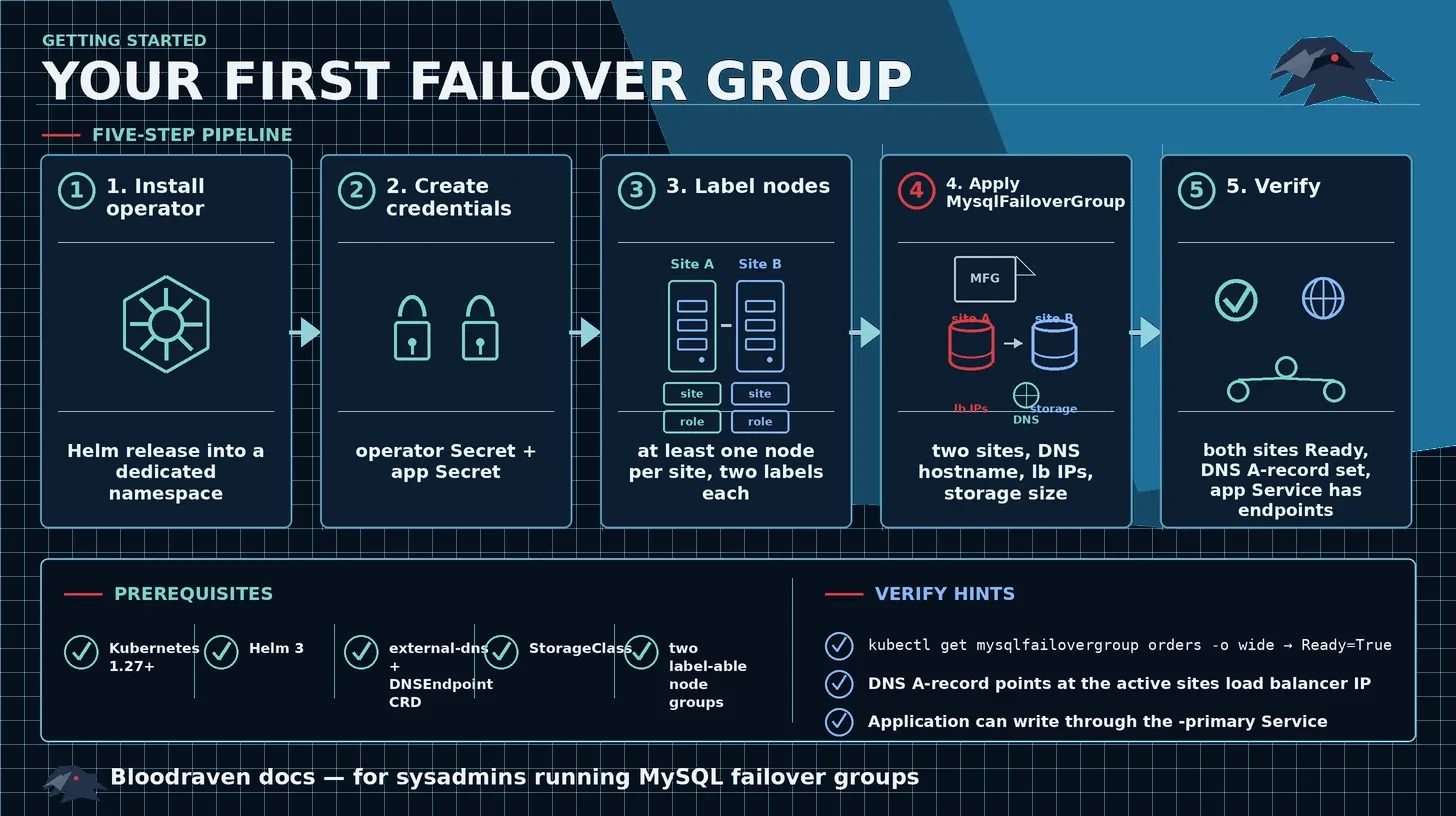
Use this guide to install Bloodraven and create a two-site MysqlFailoverGroup in a Kubernetes cluster. It is the shortest successful path for a first non-production group.
For a complete local demo with a dashboard, counter app, and chaos scenarios, use the Playground. For production dependency ownership, image pinning, monitoring, and NetworkPolicy, use Production Install.
Prerequisites
- Kubernetes 1.27 or newer.
- Helm 3.
- Two sets of nodes, each labeled for a different site.
- A working StorageClass for MySQL persistent volumes.
- external-dns configured for your DNS provider.
- The
externaldns.k8s.io/v1alpha1DNSEndpointcustom resource definition (CRD) installed in the cluster. - Optional: cert-manager, if you want Bloodraven to request certificates through
spec.tls.issuerRef.
1. Install the operator
Add the Helm repository and install the operator:
helm repo add bloodraven https://raw.githubusercontent.com/shipstream/bloodraven/gh-pages
helm upgrade --install bloodraven bloodraven/bloodraven \
  --namespace bloodraven \
  --create-namespace
Verify that the operator is running:
kubectl rollout status deployment/bloodraven -n bloodraven
kubectl get crd mysqlfailovergroups.shipstream.io
You should see the bloodraven Deployment complete its rollout and the MysqlFailoverGroup CRD registered.
2. Create MySQL credentials
Create separate Secrets for operator and application credentials. Bloodraven uses the operator credentials to manage MySQL users and replication, and it uses the application credentials for app-facing access.
kubectl create secret generic mysql-operator-creds \
  --namespace default \
  --from-literal=username=bloodraven \
  --from-literal=password=OPERATOR_PASSWORD \
  --from-literal=MYSQL_ROOT_PASSWORD=ROOT_PASSWORD

kubectl create secret generic mysql-app-creds \
  --namespace default \
  --from-literal=username=app \
  --from-literal=password=APP_PASSWORD
Replace OPERATOR_PASSWORD, ROOT_PASSWORD, and APP_PASSWORD with real values before running the commands.
spec.secretName for older manifests that use one MySQL data source name (DSN) Secret. New installs should use spec.credentials.operatorSecret and spec.credentials.appSecret.3. Label nodes by site
Label at least one node for each site. The labels must match the selectors you put in spec.sites[].taintNodeSelector.
kubectl label node NODE_IAD_1 \
  shipstream.io/failover-group.orders=true \
  shipstream.io/site.orders=iad

kubectl label node NODE_PDX_1 \
  shipstream.io/failover-group.orders=true \
  shipstream.io/site.orders=pdx
Replace NODE_IAD_1 and NODE_PDX_1 with real node names.
See Placement Contract for the full labeling and scheduling contract.
4. Create the failover group
Create orders-fg.yaml:
apiVersion: shipstream.io/v1alpha1
kind: MysqlFailoverGroup
metadata:
  name: orders
  namespace: default
spec:
  image: mysql:9.7
  sidecarImage: ghcr.io/shipstream/bloodraven-sidecar:1.3.2

  credentials:
    operatorSecret: mysql-operator-creds
    appSecret: mysql-app-creds

  dns:
    hostname: orders.az.example.com
    ttl: 60

  sites:
    - name: iad
      zone: us-east-1a
      taintNodeSelector:
        shipstream.io/failover-group.orders: "true"
        shipstream.io/site.orders: iad
      lbIP: 10.0.1.1
      storage:
        storageClassName: fast-ssd
        size: 100Gi
    - name: pdx
      zone: us-west-2a
      taintNodeSelector:
        shipstream.io/failover-group.orders: "true"
        shipstream.io/site.orders: pdx
      lbIP: 10.0.2.1
      storage:
        storageClassName: fast-ssd
        size: 100Gi

  pollInterval: 2s
  failureThreshold: 3
  recoveryThreshold: 2
  failoverCooldown: 5m
  updateStrategy: OrderedUpdate

  replication:
    maxLagSeconds: 300

  cloneTimeout: 3600
Update these values before applying the manifest:
| Field | Replace with |
|---|---|
spec.dns.hostname | The hostname that should point at the active primary. |
spec.sites[].lbIP | The load balancer IP for each site. |
spec.sites[].storage.storageClassName | A StorageClass that can create MySQL PVCs in that site. |
spec.sites[].taintNodeSelector | Labels that select only nodes in that site. |
spec.image and spec.sidecarImage | Pinned image tags for production. |
Apply the manifest:
kubectl apply -f orders-fg.yaml
5. Verify the group
Wait for the MySQL pods:
kubectl get pods -n default -l shipstream.io/failover-group=orders
Check the failover group status:
kubectl get mysqlfailovergroup orders -n default -o yaml
The status should show one active site, one writable site, one read-only site, and a Ready=True condition:
status:
  activeSite: iad
  sites:
    - name: iad
      state: writable
      replicating: false
    - name: pdx
      state: read-only
      replicating: true
      secondsBehindSource: 0
  conditions:
    - type: Ready
      status: "True"
    - type: Degraded
      status: "False"
Check the operator status API:
In one terminal, start a port forward:
kubectl port-forward -n bloodraven deploy/bloodraven 8082:8082
In another terminal, call the status endpoint:
curl http://localhost:8082/status
Smoke-test MySQL through the primary Service:
kubectl run mysql-client -n default --rm -it --restart=Never \
  --image=mysql:9.7 -- \
  mysql -h mysql-orders-primary.default.svc.cluster.local \
  -u app -pAPP_PASSWORD \
  -e 'SELECT @@hostname, @@read_only, @@super_read_only;'
Verify DNS after the first active site is selected:
kubectl get dnsendpoint -A | grep orders.az.example.com
dig orders.az.example.com
Troubleshooting first runs
If the group does not become ready, check these common causes first:
| Symptom | Likely cause | Next step |
|---|---|---|
| MySQL pod remains Pending | Node labels or StorageClass do not match the site. | Check Placement Contract. |
| Operator logs mention missing Secret keys | The credential Secret is missing a required key. | Recreate the Secret from Credentials and TLS. |
| DNS does not change | external-dns is not watching the namespace or DNSEndpoint CRD. | Check Troubleshooting. |
| Replica does not catch up | Replication credentials, network access, or clone bootstrap failed. | Check Troubleshooting. |
Next steps
- App Integration - Connect applications to the primary and replica Services.
- GitOps Guidance - Configure Argo CD or Flux ownership, sync order, and health checks.
- Failover - Understand detection, promotion, DNS steering, and cooldown behavior.
- Monitoring - Set up Prometheus metrics and alerting.
- Production Install - Move from a first group to a production-ready install.