The nine steps of a promotion
Fence, kill, drain, stop, reset, record, unfence twice, confirm. What the code actually does, which steps are fatal, and why the same failover takes twelve seconds one day and thirty-six the next.
By the end of this topic you can
- Put a site down hard enough to trigger a failover, and say why a container restart may not be enough
- Name the steps of the failover sequence in order and say which ones are fatal on error
- Explain the 30-second relay-log drain and when it costs the full budget
playground is healthy. iad is writable, pdx and reader are read-only, and the counter application is
reading and writing through mysql-playground-primary without complaint. You can already predict which
matrix row fires and which site becomes the candidate. Stop predicting and pull the plug.
kubectl -n bloodraven-playground scale deployment mysql-playground-iad --replicas=0
kubectl -n bloodraven-playground get mysqlfailovergroup playground \
  -o jsonpath='{.status.activeSite}{"\n"}'
Watch status.activeSite go from iad to pdx. Keep the counter running — the interesting part of
this unit is what the application experiences.
Getting the injection right
A widespread superstition says a pod delete does not trigger failover. It does. Scenario 09b
force-deletes the primary with --grace-period=0 --force, hard-waits for activeSite to flip and
lastFailover to stamp before it even reaches its real assertion, and passes. The sub-five-second
Deployment respawn does not save the primary because the debounce never watches pod objects: it watches
whether mysqld answers CheckReadOnly, and a cold container start plus InnoDB recovery comfortably
exceeds the six-second detection window.
Scenario 01 uses scale-to-0 for determinism, not because delete fails: a pod-delete races the respawn, and that race can restore the original topology through split-brain recovery instead of completing the failover. The genuine no-failover cases are different in kind:
| Injection | What survives | Does it fail over? |
|---|---|---|
scale deployment --replicas=0 | nothing | Yes, and the site stays down |
delete pod --grace-period=0 --force | PVC, Service, node | Yes, but it races the ~5 s respawn |
SQL SHUTDOWN, restart in place (scenario 16) | pod, PVC, IP | Maybe — 16 accepts either outcome, depending on the kubelet’s restart speed against the ~6 s window |
| Pod crash, PVC intact | data | No — RPO 0; the primary returns writable and is kept |
The sequence the code actually runs
FailoverController.Execute in internal/controller/failover.go is the whole promotion, and it is
short enough to read in one sitting. There are nine steps. What matters about each is not what it
does — you can guess most of that — but whether an error aborts the failover or merely produces a log
line.
Put these in the order they happen.
- Fence the old primary — SET GLOBAL super_read_only = ON — Warns only. The old primary is usually unreachable — that is the whole reason you are here.
- Kill application connections on the old primary — Warns only. Undocumented. SELECT id FROM information_schema.processlist WHERE id != CONNECTION_ID() AND command NOT IN ('Binlog Dump', 'Binlog Dump GTID'), then KILL per row.
- Relay-log drain on the candidate, 30 s budget — Non-fatal. On timeout the operator logs a warning and promotes anyway.
- STOP REPLICA — Fatal. Execute returns the error and no promotion happens.
- RESET REPLICA ALL — Fatal. Returns immediately on error.
- Record the promotion GTID — SELECT @@global.gtid_executed — Non-fatal. A warning only; promotion continues without the record.
- SET GLOBAL super_read_only = OFF — Fatal.
- SET GLOBAL read_only = OFF — Fatal.
- Writable confirmation — Synchronous, in the same call stack. On failure the operator logs that promotion succeeded but DNS was not flipped, and returns.
Read the fatality column as a design statement. Fencing failure does not block promotion; neither
does a failed connection kill, an exhausted drain, or a GTID read that errors. The only statements the
operator refuses to proceed past are the four that change the candidate’s own replication and
read-only state. Note too what the kill query’s WHERE clause protects: Binlog Dump threads are
excluded, so killing application sessions does not tear down replication.
Promotion is two statements, not one
If you learned read_only=0 as the promotion command, you have a wedged-primary gap.
super_read_only is the actual barrier: it prohibits updates even from CONNECTION_ADMIN or SUPER,
which plain read_only does not, and it is the variable the sidecar fences with. The operator clears
it first and read_only second, and a failure of either is fatal. MySQL couples the two — setting
read_only=OFF implicitly forces super_read_only=OFF — so the point of knowing both is not the
typing. It is that a site reporting super_read_only=ON has been fenced, and reading that as “just a
replica” is how people go looking for a wedged primary in the wrong place.
Then the ordering fact that shows the design’s paranoia. Once promotion and writable confirmation both succeed, the operator stamps the durable failover record and increments the failover counter before it touches DNS, so a DNS-provider outage cannot erase the fact that a promotion happened. A failed DNS flip is logged and heals on the next poll; a forgotten promotion would not.
kubectl -n bloodraven-playground logs -l app.kubernetes.io/name=bloodraven | grep 'failover complete'{"time":"2026-04-30T20:55:52.912585929Z","level":"INFO","msg":"failover complete","fg":"bloodraven-playground/playground","promotedSite":"pdx","promotionGtid":"0e29fbce-44d6-11f1-b93f-2e1a52f79466:1-9"}Two things that are not steps
Node taints are not part of this sequence. They are a pure function of per-site state transitions, applied earlier in the same poll by a different code path — writable-to-anything-else adds the taint, anything-else-to-writable removes it, read-only ↔ unreachable does nothing. A taint appears around a failover because the same transition triggers both.
Source convergence is not part of it either. It is an independent poll stage with its own 20 s budget, repointing replicas at whichever site is now authoritative. Both are neighbours in the poll, not links in the chain — which matters the moment one of them fails, because a failed taint or a failed repoint retries on the next poll rather than aborting a promotion.
Inside the 30-second drain
The drain lets the candidate apply the relay logs it already fetched before it takes writes. It exits
early the moment the SQL thread is running and Seconds_Behind_Source reads 0. Internally it waits
500 ms, doubling to a 4 s ceiling; if the SQL thread is stopped with unapplied relay logs it restarts
the thread once and retries. A timed-out drain logs relay log drain did not complete cleanly, proceeding with promotion and promotes with whatever the candidate had applied.
Twelve seconds, and thirty-six
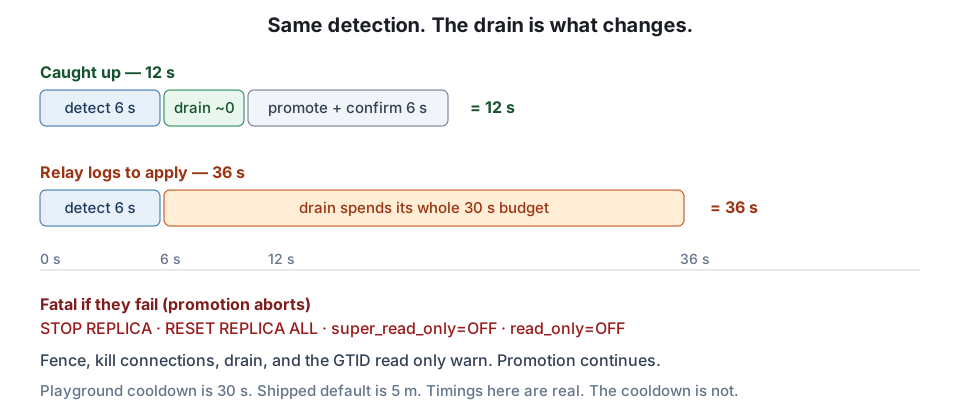
A clean primary kill flips activeSite in 12.0 s, reproducible across nine-plus independent runs
(12.004 s to 12.02 s, one outlier at 13.008 s). Scenario 14 pauses the replica’s SQL applier, seeds
five seconds of writes, kills the primary, and measures 36.005 s.
The difference is entirely the drain. Both runs pay the same 6 s of detection — pollInterval 2 s ×
failureThreshold 3. In the 12 s case the candidate is already caught up and the drain returns at once
on its early-exit condition. In the 36 s case it has relay logs to apply and spends its whole budget:
36.005 s − 12.0 s = 24.0 s of extra wall clock. Learn 12 s typical and roughly 37 s worst case (6 s
detect + 30 s drain), and be able to say which you are looking at. Published wall-clock figures for
failover — anyone’s, including Bloodraven’s own pages — are estimates; the run recorded under
playground/chaos-results/ is the measurement, and it is the one you can produce yourself. One caveat before you trust your own stopwatch: the
playground overrides failoverCooldown to 30 s against a shipped default of 5 m. The timings here are
real. The cooldown is not.
The promotion was flawless. Your application still needs telling — and only one half of it complains.
iadis scaled to zero and staying down. The operator promotedpdxin about twelve seconds, the DNS record flipped, the-primaryService selector moved. Now go and look at the counter app, because what it does next is two different failures wearing one incident.The browser polls
/api/counterevery two seconds. That is a read, and it keeps succeeding — on the pooled socket the app opened toiadbefore any of this happened. The response comes back200, the value it carries is whateveriadhad when it stopped being primary, and the app’s owndbHostfield still namesiad. Nothing errors. Nothing retries. The number on the screen simply stops moving, and a number that stops moving looks exactly like a quiet Tuesday.Now press + Increment. That is the write, and it fails immediately and loudly:
ERROR 1290 (HY000): The MySQL server is running with the --read-only option, surfaced as an HTTP 500. Writes do not drift. They break on the first attempt, with an error code that names the cause.So the failure is not subtle. It is split in half: writes fail fast and visibly, reads succeed and lie. And the reason nobody was paged is neither of those — it is that nothing anywhere is watching the only signal that would have caught it.
BloodravenFailoverOccurredfires off the operator’s own counter and says the operator finished, not that traffic recovered. Not one shipped alert watches application write failures. The half that screams is the half nothing is listening to.The mechanism is worth stating exactly, because Unit 4 builds three fixes on it.
super_read_onlyblocks writes but closes no sockets, so a session that was already open keeps serving reads from a demoted site. The operator’s one countermeasure,KillAppConnections, needs a reachable old primary — and you have heldiaddown, so there is nothing to connect to and nothing to kill.One honest caveat before you go looking, because it is also the first half of the fix. The counter app sets
SetConnMaxLifetime(30 * time.Second), so its stale window closes on its own inside about thirty seconds. Look within thirty seconds of the promotion or you will miss it — and notice that the reason it self-heals is a pool setting somebody chose, not anything Bloodraven did.The model to carry out of here: the operator’s job ends at a label selector and a DNS record, and a socket that was already open is outside its reach. Unit 4 is where you close it. Not yet.
Where this leaves you
You have driven a real emergency failover on playground, you can recite the nine steps with fatality per
step, and you can look at a 36 s run and name the 24 s the drain spent. You have also seen something
that should bother you. Before you fix it you need the other half of the story: not how long the
failover took, but which transactions did not make it. That count is in the group’s status right now,
and the next topic reads it.
Flashcards
The step of the failover sequence that appears nowhere in the documentation
Step 2 — kill application connections on the old primary: SELECT id FROM information_schema.processlist WHERE id != CONNECTION_ID() AND command NOT IN ('Binlog Dump', 'Binlog Dump GTID'), then KILL each id.
Which threads does the connection-kill query deliberately spare, and why?
Binlog Dump and Binlog Dump GTID — the replication dump threads, so killing application sessions does not tear down replication to the surviving sites.
The four steps of Execute() whose error aborts the failover
STOP REPLICA, RESET REPLICA ALL, SET GLOBAL super_read_only = OFF, SET GLOBAL read_only = OFF — the four that change the candidate's own replication and read-only state.
Relay-log drain: budget, first wait, wait ceiling
30 s budget; the first wait is 500 ms and doubles each round to a 4 s ceiling.
The relay-log drain's early-exit condition
The SQL thread is running and Seconds_Behind_Source reads 0 — the drain returns immediately.
A site reports super_read_only = ON. What does that tell you?
It has been fenced — super_read_only is what the sidecar and the operator fence with, and it blocks writes even from CONNECTION_ADMIN or SUPER.
Measured time for status.activeSite to flip after a clean primary kill on the playground
12.0 s, reproducible across nine-plus independent recorded runs (12.004 s to 12.02 s, one outlier at 13.008 s).
What scenario 14 does to the replica before it kills the primary
Pauses the replica's SQL applier and seeds five seconds of writes, so the candidate has unapplied relay logs when the drain starts.
What the operator stamps before it flips DNS, and why
The durable failover record and the failover counter — deliberately, so a DNS-provider outage cannot erase the fact that a promotion happened.
Which code path applies the node taint around a failover?
The per-site transition handler, earlier in the same poll — taints are a pure function of the state transition, not a step of the failover sequence.
Source convergence: budget and where it runs
An independent poll stage with its own 20 s budget, repointing replicas at the authoritative site — not a link in the promotion chain.
Why does scenario 01 hold the site down with scale-to-0 instead of deleting the pod?
Determinism — a pod-delete races the ~5 s Deployment respawn, and that race can restore the original topology through split-brain recovery instead of completing the failover.
Quiz
Show answer
Answer: The operator logs a warning and carries straight on to the next step
Fencing the old primary is a warn-only step: the code logs 'failed to fence old primary (may be unreachable)' and continues. That is the design, not an oversight — the old primary is usually unreachable, which is the whole reason a failover is running. Option 1 is the common belief that fencing gates promotion; it does not, and if it did, an unreachable primary would block every failover you actually need. Option 3 invents a half-promoted state that does not exist in Execute(): the two read-only clears are unconditional and fatal on error. Option 4 confuses two independent things — the drain's 30 s budget is about the candidate's relay logs and is never shortened by what happened on the old primary. Only STOP REPLICA, RESET REPLICA ALL and the two read-only clears abort the sequence. (objective 2)
Fencing the old primary is a warn-only step: the code logs 'failed to fence old primary (may be unreachable)' and continues. That is the design, not an oversight — the old primary is usually unreachable, which is the whole reason a failover is running. Option 1 is the common belief that fencing gates promotion; it does not, and if it did, an unreachable primary would block every failover you actually need. Option 3 invents a half-promoted state that does not exist in Execute(): the two read-only clears are unconditional and fatal on error. Option 4 confuses two independent things — the drain's 30 s budget is about the candidate's relay logs and is never shortened by what happened on the old primary. Only STOP REPLICA, RESET REPLICA ALL and the two read-only clears abort the sequence. (objective 2)
Show answer
Answer: False
The reversal: a force-delete does trigger failover, and the fast respawn does not save the primary. Scenario 09b force-deletes the primary and hard-waits for activeSite to flip and lastFailover to stamp before it even reaches its real assertion — and it passes. The debounce never looks at pod objects; it looks at whether mysqld answers CheckReadOnly, and a cold container start plus InnoDB recovery comfortably exceeds the 6 s detection window (pollInterval 2 s x failureThreshold 3). The genuinely marginal injection is a container restart in place — scenario 16 issues SQL SHUTDOWN, keeps the pod, PVC and IP, and explicitly accepts either outcome depending on how fast the kubelet restarts the container against that same ~6 s window. Scale-to-0 is preferred in scenario 01 for determinism, not because delete fails. (objective 1)
The reversal: a force-delete does trigger failover, and the fast respawn does not save the primary. Scenario 09b force-deletes the primary and hard-waits for activeSite to flip and lastFailover to stamp before it even reaches its real assertion — and it passes. The debounce never looks at pod objects; it looks at whether mysqld answers CheckReadOnly, and a cold container start plus InnoDB recovery comfortably exceeds the 6 s detection window (pollInterval 2 s x failureThreshold 3). The genuinely marginal injection is a container restart in place — scenario 16 issues SQL SHUTDOWN, keeps the pod, PVC and IP, and explicitly accepts either outcome depending on how fast the kubelet restarts the container against that same ~6 s window. Scale-to-0 is preferred in scenario 01 for determinism, not because delete fails. (objective 1)
Show answer
Answer: It is the variable the sidecar fences with, and it blocks writes even from CONNECTION_ADMIN or SUPER, which read_only alone does not
super_read_only is the real barrier — the MySQL manual is explicit that it prohibits updates even from users holding CONNECTION_ADMIN or SUPER, while read_only does not — and it is exactly what the sidecar's fencing sets. A candidate arriving at promotion may already be fenced, so the promotion has to clear that specific variable. Option 2 is backwards: MySQL couples the two the other way round, and setting read_only=OFF implicitly forces super_read_only=OFF. Option 3 confuses fencing with replication control: replication threads keep applying under super_read_only, which is precisely why STOP REPLICA and RESET REPLICA ALL are separate, fatal steps. Option 4 invents persistence — neither variable survives a restart on its own, and durability of the promotion comes from the failover record stamped before the DNS flip. (objective 2)
super_read_only is the real barrier — the MySQL manual is explicit that it prohibits updates even from users holding CONNECTION_ADMIN or SUPER, while read_only does not — and it is exactly what the sidecar's fencing sets. A candidate arriving at promotion may already be fenced, so the promotion has to clear that specific variable. Option 2 is backwards: MySQL couples the two the other way round, and setting read_only=OFF implicitly forces super_read_only=OFF. Option 3 confuses fencing with replication control: replication threads keep applying under super_read_only, which is precisely why STOP REPLICA and RESET REPLICA ALL are separate, fatal steps. Option 4 invents persistence — neither variable survives a restart on its own, and durability of the promotion comes from the failover record stamped before the DNS flip. (objective 2)
Show answer
Answer: Confirming the candidate is writable before the DNS record is flipped
Writable confirmation runs synchronously in the same call stack as the promotion — not deferred to the next poll — and on failure the operator logs that promotion succeeded but DNS was not flipped, and returns. Option 1 is the most common misreading: taints are a pure function of per-site state transitions and are applied earlier in the same poll by a different code path, so they merely appear alongside a failover. Option 2 is source convergence, an independent poll stage with its own 20 s budget; the published sequence lists it as a step, and that is a documentation error. Option 4 belongs to old-primary recovery, which runs later and only once the old primary comes back. Neighbours in the poll are not links in the chain. (objective 2)
Writable confirmation runs synchronously in the same call stack as the promotion — not deferred to the next poll — and on failure the operator logs that promotion succeeded but DNS was not flipped, and returns. Option 1 is the most common misreading: taints are a pure function of per-site state transitions and are applied earlier in the same poll by a different code path, so they merely appear alongside a failover. Option 2 is source convergence, an independent poll stage with its own 20 s budget; the published sequence lists it as a step, and that is a documentation error. Option 4 belongs to old-primary recovery, which runs later and only once the old primary comes back. Neighbours in the poll are not links in the chain. (objective 2)
Show answer
Answer:
Both runs pay the same 6 s of detection (pollInterval 2 s x failureThreshold 3), so detection is not the difference. In the 12 s runs the candidate is already caught up, so the relay-log drain hits its early-exit condition — SQL thread running, Seconds_Behind_Source 0 — and returns almost immediately. In the 36 s run the candidate had relay logs it had fetched but not applied, so the drain spent essentially its whole 30 s budget before the operator promoted anyway (the drain is non-fatal on timeout): 36.005 s - 12.0 s = 24.0 s of extra wall clock. To confirm it, I would look for the warning 'relay log drain did not complete cleanly, proceeding with promotion' in the operator log, and for a stopped or lagging SQL applier on the candidate in the period before the kill — scenario 14 produces exactly this by pausing the applier and seeding five seconds of writes.
A full-credit answer shows: A strong answer: (a) names detection as the constant 6 s and derives it from pollInterval x failureThreshold; (b) attributes the whole difference to the relay-log drain, not to detection, DNS or the promotion statements; (c) states the drain's 30 s budget and its early-exit condition (SQL thread running and Seconds_Behind_Source = 0) as the reason the fast case is fast; (d) notes the drain is non-fatal, so the promotion proceeded anyway; (e) offers a checkable artefact — the drain warning in the operator log, or an unapplied relay-log backlog on the candidate. Answers that blame DNS propagation, the anti-flap cooldown, or a slower promotion have missed it.
The 12.0 s and 36.005 s figures are both measured, and the gap is entirely the drain: the same 6 s detection, then either an instant early exit or a full 30 s budget spent applying relay logs. This is also why the worst case is around 37 s (6 s detect + 30 s drain) rather than the documentation's unsourced 30-45 s. (objectives 2, 3)
Sample answer
Both runs pay the same 6 s of detection (pollInterval 2 s x failureThreshold 3), so detection is not the difference. In the 12 s runs the candidate is already caught up, so the relay-log drain hits its early-exit condition — SQL thread running, Seconds_Behind_Source 0 — and returns almost immediately. In the 36 s run the candidate had relay logs it had fetched but not applied, so the drain spent essentially its whole 30 s budget before the operator promoted anyway (the drain is non-fatal on timeout): 36.005 s - 12.0 s = 24.0 s of extra wall clock. To confirm it, I would look for the warning 'relay log drain did not complete cleanly, proceeding with promotion' in the operator log, and for a stopped or lagging SQL applier on the candidate in the period before the kill — scenario 14 produces exactly this by pausing the applier and seeding five seconds of writes.
A full-credit answer shows
A strong answer: (a) names detection as the constant 6 s and derives it from pollInterval x failureThreshold; (b) attributes the whole difference to the relay-log drain, not to detection, DNS or the promotion statements; (c) states the drain's 30 s budget and its early-exit condition (SQL thread running and Seconds_Behind_Source = 0) as the reason the fast case is fast; (d) notes the drain is non-fatal, so the promotion proceeded anyway; (e) offers a checkable artefact — the drain warning in the operator log, or an unapplied relay-log backlog on the candidate. Answers that blame DNS propagation, the anti-flap cooldown, or a slower promotion have missed it.
The 12.0 s and 36.005 s figures are both measured, and the gap is entirely the drain: the same 6 s detection, then either an instant early exit or a full 30 s budget spent applying relay logs. This is also why the worst case is around 37 s (6 s detect + 30 s drain) rather than the documentation's unsourced 30-45 s. (objectives 2, 3)