Stand it up and read its status
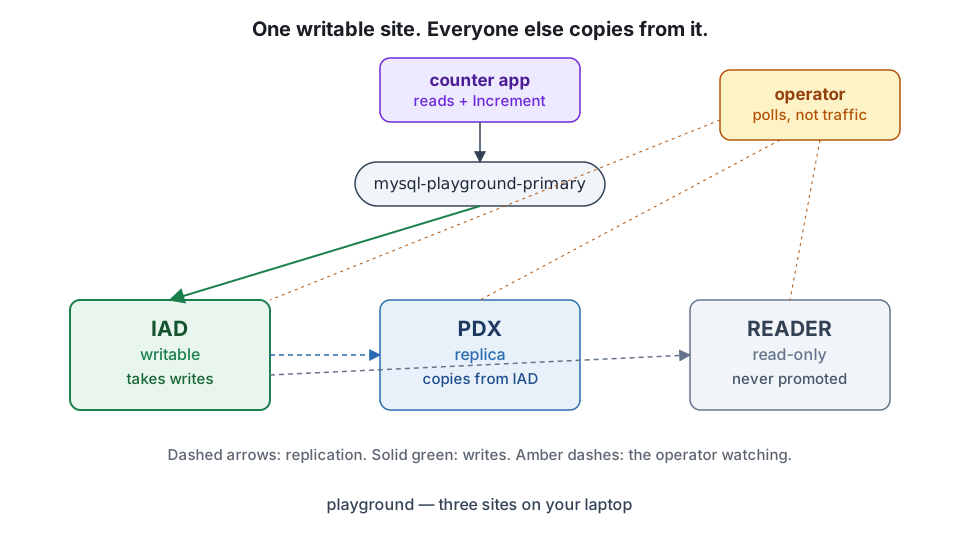
Two minutes to a live three-site group with an app reading and writing through it. Then the skill everything else rests on: reading the status and saying what is true right now.
By the end of this topic you can
- Bring up a three-site group with
./playground/setup.shand confirm every site reports Ready - Read a
MysqlFailoverGroupstatus and name the active site, each site's state, and the replica's lag - Watch the counter application write through
mysql-playground-primaryand find the same row on the replica
This course is about a MySQL that has to survive losing a whole site. The fastest way in is not a vocabulary list. It is a real group on your laptop, and a status dump you can read.
Before you start
| You need | Why |
|---|---|
| docker or podman | Builds the images locally. Prefer docker — k3d’s podman support is experimental. |
| kubectl | Everything from here is kubectl. |
| helm | Installs the operator. Chart 1.0.0, appVersion 1.0.0, kubeVersion: ">=1.26.0". |
| A cluster with at least three worker nodes | One worker per site. The third is dedicated to the reader so storage-loss testing is deterministic. |
k3d cluster create bloodraven --agents 3kind and minikube work too — one server plus three agents either way.
One non-technical check while you are here. Bloodraven is source-available, not open source.
Whether your organisation may run it in production is a licensing question, not a git clone.
The baseline and the two commands that settle it live in section D of the
version appendix. Nothing in this course depends on the
answer. Your production plan might.
Bring it up
From the repository root:
./playground/setup.shThat script labels one worker per site, builds and loads the images, installs the CRDs and the operator, creates the group, and deploys a dashboard and a counter app. About two minutes.
Change nothing. Every command in this course is written against the group exactly as that
script creates it — metadata.name: playground in bloodraven-playground. The group name is
baked into node labels, Helm flags and a Go constant, so renaming it quietly breaks later tools.
Three MySQL pods. Each runs mysql beside a sidecar container, so a healthy site reads 2/2:
kubectl -n bloodraven-playground get pods -l app.kubernetes.io/name=mysqlRead the status
status is the operator’s report on the group. A handful of fields carry everything you will
read for the rest of the course.
status.activeSite is the site the operator currently treats as writable. One name, or empty.
status.sites[] runs parallel to spec.sites. Per site:
.state— one of four values:writable,read-only,unreachable,unknown. It comes from one query per poll,SELECT @@read_only:0iswritable,1isread-only, a failed connection isunreachable..replicating— whether the operator currently regards replication on that follower as healthy. It is a verdict, not a raw thread flag..secondsBehindSource— MySQL’sSeconds_Behind_Sourcefor that follower..gtidExecuted— the transaction history that follower has actually applied.
There is a trap in that list. The operator probes replication only on sites whose state is
read-only, so the writable primary’s entry carries no replicating, no secondsBehindSource
and no gtidExecuted at all — those keys are absent, not zero. Absence means “not measured
here”, never false.
And .role is not there at all. Role lives in spec.sites[].role. To tell which of two
read-only sites is the dedicated reader, read the spec.
kubectl -n bloodraven-playground get mysqlfailovergroup playground -o jsonpath='{.status.activeSite}{"\n"}'iadkubectl -n bloodraven-playground get mysqlfailovergroup playground -o jsonpath='{range .status.sites[*]}{.name}{"\t"}{.state}{"\t"}{.replicating}{"\t"}{.secondsBehindSource}{"\n"}{end}'iad writable
pdx read-only true 0
reader read-only true 0kubectl -n bloodraven-playground get mysqlfailovergroup playground -o jsonpath='{.status.conditions[?(@.type=="Degraded")].reason}{"\n"}'HealthyTwo blank columns on the iad row. That is the point.
Conditions and the five reasons
The group carries a Ready condition — true when a site is writable and replication is healthy —
and a Degraded condition with a reason string. Five reasons come from the decision table.
Each describes a shape, not an action:
| Reason | The shape it describes |
|---|---|
Healthy | Exactly one core site writable, none unreachable. Degraded is False. |
Degraded | Anything short of healthy that is not one of the three below — a live primary with an unreachable peer, or a writable non-promotable site awaiting fencing. |
SplitBrain | More than one core site is writable at the same time. |
NoPrimary | No core site is writable and none is unreachable — every one of them is read-only. |
TotalLoss | Every core site is unreachable. |
Two surprises. There is no Failover reason: the topology one promotion away from recovery
reports Degraded. And role: read-only sites are excluded from those tallies — a dead
reader never reads as TotalLoss.
What the operator does about each shape is Unit 2. Here, you only read them.
Watch a write land on both sides
kubectl -n bloodraven-playground port-forward svc/dashboard 8091:8091
kubectl -n bloodraven-playground port-forward svc/counter-app 8090:8090
The counter app at localhost:8090 connects through mysql-playground-primary. It has exactly
two code paths:
| Path | What it runs | When |
|---|---|---|
read — GET /api/counter | SELECT value, updated_at …, then SELECT @@global.read_only and SELECT @@hostname on the same connection | the page polls it every two seconds |
write — POST /api/increment | UPDATE counter_db.counters SET value = value + 1 WHERE id = 1 | only when you press + Increment |
Nothing writes on a timer. You decide when a write happens. And because the read path asks the
same connection who it is talking to, the JSON carries dbHost and readOnly beside value.
In Unit 3 those three fields will disagree with the cluster in a way you can see.
Press + Increment a few times, then go looking for that row on the replica — by name, not through the primary Service:
kubectl -n bloodraven-playground exec deploy/mysql-playground-pdx -c mysql -- \
  env MYSQL_PWD=playground-root-pw mysql -h127.0.0.1 -uroot -Nse \
  "SELECT value, updated_at FROM counter_db.counters WHERE id = 1"
Same value you just clicked to. That round trip is the whole data plane in two commands.
One honest warning
The playground overrides shipped defaults so experiments finish while you are still watching. A timing you observe here is not the shipped default:
| Setting | Playground | Shipped default |
|---|---|---|
failoverCooldown | 30s | 5m |
replication.maxLagSeconds | 30 | 300 |
dns.ttl | 10 | 60 |
Everything else matches: pollInterval, failureThreshold, recoveryThreshold, leaseTimeout,
peerCheckInterval and maxSyncWait sit at their defaults. MySQL is mysql:9.7, the operator
v1.0.0.
Words for the first hour
You will meet these on every later page. One sentence each.
| Word | Meaning here |
|---|---|
| Site | One MySQL plus its sidecar, pinned to one place (iad, pdx, reader). |
| Primary | The one site that currently accepts writes. Named in status.activeSite. |
| Replica | A site that copies from the primary and is not taking writes. |
| Failover | Promoting a replica to primary because the old primary is gone or being moved. |
| Operator | The controller that polls sites and decides who is primary. Not on the request path. |
| Sidecar | A second container in each MySQL pod. It can stop its own MySQL writing without asking the operator. |
| Service | A Kubernetes name your app connects to. -primary always points at whoever is writable right now. |
| RPO | How much recently committed data you accept losing. Bloodraven’s RPO on a crash is not zero. |
| RTO | How long you accept being unable to write. This is where Bloodraven spends its budget. |
| GTID | A unique id for every transaction. The set of them is how you count what a failover cost. |
| Fence | SET GLOBAL super_read_only = ON. Blocks writes. Does not close existing connections. |
The full card is Unit 7. This is enough to start.
Where you are
playground is up: three sites, iad writable and named in activeSite, pdx and reader
read-only and replicating at 0 seconds behind, Degraded reason Healthy, and a counter
application reading and writing through mysql-playground-primary.
Next: what those pods actually are, and which of them is allowed to become primary.
Flashcards
status.activeSite
The single site the operator currently treats as the writable authority — one site name, or empty when no site holds authority.
How a site's status.sites[].state is decided
From one query per poll, SELECT @@read_only: 0 gives writable, 1 gives read-only, a failed connection gives unreachable, and a site not yet polled is unknown.
status.sites[].replicating
The operator's verdict on whether replication is healthy on that follower — populated only for sites currently in read-only state, never for the writable primary.
status.sites[].gtidExecuted
The executed GTID set read from that follower's replication status: the transaction history it has actually applied.
A site entry that carries no replicating, no secondsBehindSource and no gtidExecuted key at all
It is the writable primary. The operator only probes replication on read-only sites, so those keys are absent rather than zero or false.
Condition reason Healthy
Exactly one core site is writable and none is unreachable; the Degraded condition reads False.
Condition reason Degraded
Any shape short of healthy that is not split brain, no primary or total loss — including a live primary with an unreachable peer.
Condition reason SplitBrain
More than one core site is writable at the same time.
Condition reason NoPrimary
No core site is writable and none is unreachable — every core site is read-only.
Condition reason TotalLoss
Every core site is unreachable.
Quiz
Show answer
Answer: iad — it is named in activeSite and it is the one site whose state is writable
activeSite names the site the operator currently treats as the writable authority, and iad is the only entry in state writable — the two agree, which is what a healthy group looks like. pdx is wrong because replicating: true marks a follower applying the primary's stream, not a primary; the primary is never probed for replication at all. The first-entry answer is wrong because status.sites[] runs parallel to spec.sites, in declaration order, with no relation to who is primary. The last option confuses activeSite with status.lastFailoverTarget, which is the field that records a past promotion. (objective 8)
activeSite names the site the operator currently treats as the writable authority, and iad is the only entry in state writable — the two agree, which is what a healthy group looks like. pdx is wrong because replicating: true marks a follower applying the primary's stream, not a primary; the primary is never probed for replication at all. The first-entry answer is wrong because status.sites[] runs parallel to spec.sites, in declaration order, with no relation to who is primary. The last option confuses activeSite with status.lastFailoverTarget, which is the field that records a past promotion. (objective 8)
Show answer
Answer: Read spec.sites[].role — the status block carries no role field
Role is spec, not status: status.sites[] carries name, state, lastSeen, replication fields and recovery fields, and nothing about role. The second option is the common trap — the documentation talks about site roles beside site state and it is easy to assume both live in the same block; they do not, and status.sites[].role simply does not exist. The third confuses role with state: both a primary-candidate follower and a read-only reader sit in state read-only when they are healthy, which is exactly why the dump cannot separate them. The fourth invents a field — lbIP is spec, and status never mirrors it. (objective 8)
Role is spec, not status: status.sites[] carries name, state, lastSeen, replication fields and recovery fields, and nothing about role. The second option is the common trap — the documentation talks about site roles beside site state and it is easy to assume both live in the same block; they do not, and status.sites[].role simply does not exist. The third confuses role with state: both a primary-candidate follower and a read-only reader sit in state read-only when they are healthy, which is exactly why the dump cannot separate them. The fourth invents a field — lbIP is spec, and status never mirrors it. (objective 8)
Show answer
Answer: Healthy — role: read-only sites are excluded from the writable/read-only/unreachable tallies
The reasons are computed over core sites only, and a site with role: read-only is not a core site — so a dead reader leaves the tally at one writable, zero unreachable, which is Healthy. The second option is the most tempting and would be right if the unreachable site were pdx: a live primary with an unreachable core peer is exactly the Degraded shape, but the reader does not count. TotalLoss requires every core site unreachable, not one site of any kind. NoPrimary describes the opposite situation — no writable site at all, every core site read-only — and here iad is writable. (objective 8)
The reasons are computed over core sites only, and a site with role: read-only is not a core site — so a dead reader leaves the tally at one writable, zero unreachable, which is Healthy. The second option is the most tempting and would be right if the unreachable site were pdx: a live primary with an unreachable core peer is exactly the Degraded shape, but the reader does not count. TotalLoss requires every core site unreachable, not one site of any kind. NoPrimary describes the opposite situation — no writable site at all, every core site read-only — and here iad is writable. (objective 8)
Show answer
Answer: False
The reversal: a zero does not prove the replica is caught up. Seconds_Behind_Source compares the last transaction the replica has executed against the last event it has downloaded, so it reads 0 when the receiver thread has stalled or the replica is simply idle — a replica that stopped fetching an hour ago can still report 0. That is why the check in this topic is to go and read the row: SELECT value, updated_at FROM counter_db.counters WHERE id = 1 against pdx by name. Nothing in the status block substitutes for reading the data. (objectives 8, 9)
The reversal: a zero does not prove the replica is caught up. Seconds_Behind_Source compares the last transaction the replica has executed against the last event it has downloaded, so it reads 0 when the receiver thread has stalled or the replica is simply idle — a replica that stopped fetching an hour ago can still report 0. That is why the check in this topic is to go and read the row: SELECT value, updated_at FROM counter_db.counters WHERE id = 1 against pdx by name. Nothing in the status block substitutes for reading the data. (objectives 8, 9)
Show answer
Answer:
secondsBehindSource: 0 is a reported measurement — MySQL answered the replication probe and gave a lag of zero seconds. An absent key means no value was reported: MySQL returned NULL, which is what it does when replication is not running, or the operator never probed that site at all, which is the case for the writable primary. Treating absence as zero reads a site that is not replicating as a site that is perfectly caught up — precisely backwards. Absence means unmeasured, not good.
A full-credit answer shows: A strong answer covers: (1) 0 is a value MySQL actually reported; (2) an absent key is a null/unreported value, arising when replication is not running or when the site was never probed — the primary is never probed; (3) the failure mode is inverted meaning, reading 'unmeasured' as 'zero lag'. Credit also for noting the field is optional in the status schema, so it is omitted rather than serialised as null.
The two look alike in a quick scan and mean opposite things. A reported 0 says the probe ran; an absent key says it did not, or MySQL had nothing to report. On a healthy group the primary's entry is the everyday example of the absent form, which is why it is worth learning on a healthy cluster rather than in an incident. (objective 8)
Sample answer
secondsBehindSource: 0 is a reported measurement — MySQL answered the replication probe and gave a lag of zero seconds. An absent key means no value was reported: MySQL returned NULL, which is what it does when replication is not running, or the operator never probed that site at all, which is the case for the writable primary. Treating absence as zero reads a site that is not replicating as a site that is perfectly caught up — precisely backwards. Absence means unmeasured, not good.
A full-credit answer shows
A strong answer covers: (1) 0 is a value MySQL actually reported; (2) an absent key is a null/unreported value, arising when replication is not running or when the site was never probed — the primary is never probed; (3) the failure mode is inverted meaning, reading 'unmeasured' as 'zero lag'. Credit also for noting the field is optional in the status schema, so it is omitted rather than serialised as null.
The two look alike in a quick scan and mean opposite things. A reported 0 says the probe ran; an absent key says it did not, or MySQL had nothing to report. On a healthy group the primary's entry is the everyday example of the absent form, which is why it is worth learning on a healthy cluster rather than in an incident. (objective 8)